

AceWright currently manages notes, meetings, etc. through a notion dashboard. This is suitable for now but in the future we would also like clients to have access to agreed meeting times, view due dates, shared notes, etc. We would also like some form of automation such as posting articles to our website, scheduling social media posts or notifying key person(s) via email before a deadline/meeting.
Our process for development where we are working from-scratch is to begin by fully discovering the problem we are solving to prioritize ideas effectively. Later, we can go into more detail about individual features and how best to implement them.
#Brief
Let’s begin by putting together a brief, these are around 1-2 pages describing at the bare minimum what the system needs to do. This similar to a brief you would put together with us in the first stage of working together.
Currently, we have three different sections in our notion dashboard: Home, Documents, CRM and Articles/Posts.
#Home
Our Home has a navigation bar showing links to all other states, our next actions and a todo list.
#Documents
This is any document related to the business that is not related to a client or social media. These include business plans, market research, technical knowledge, testimonials, etc.
These documents have the following attributes:
- Uses markdown
- Has a status: In progress, Completed, Not Started, Living (a document that is continuously updated)
- Created time
- Updated time
#CRM
Our CRM is how we keep track of client meetings, notes, etc. Customers have the following attributes:
- Name (person(s) of contact)
- Company
- Email (optional)
- Method of contact
- Status: Potential Lead, New lead, Engaging, Working/Engaged, Closed-Won, Closed-Lost
A customer can have:
- Notes using markdown attached to dates
- Documents such as requirements, contracts, etc.
#Articles/Posts
Before drafting an article or post we typically start in Notion. After we post to our site and schedule the post across different social media accounts. An article and post are both similar, with varying lengths. For simplicity we will call these using a single term: Content. Content has the following attributes:
- Name
- Date
- Platforms posted to: LinkedIn, Twitter, Website, Medium, Dev.to (multiselect)
- Type: Long-form, short-form, image
#Existing Data
Depending on the amount of data we currently have, we might want to be able to import via CSV into our database. This could be done by allowing users to upload a CSV file. However, because the amount of data we currently have is not large, this is unnecessary at this stage.
#User Story Mapping
Once we have a brief put together, our next step depends upon our goals. Do we need a minimal version up quickly? Do we need a clear path to a full-featured app? Do we need to discover how to delight our users? With this portal, our goal is to discover how we can make our processes more efficient as well as keeping it minimal. For this scenario, I like to use a different flavour of User Story Mapping. This allows us to think user actions first and how to build a system around that, if we built in reverse our users might feel the system is blocking progress.
The flavour we like to use in cases like these involves starting with splitting our app into separate sections. For many MVPs you would want this to either be a single or at most two sections to prevent overbuilding. However, in our case we have used our dashboard with this structure for quite a while and know that this is something we need.
The goal of this exercise is to understand how our user completes their tasks in the context of our system, how they overlap and areas that can be made more efficient.
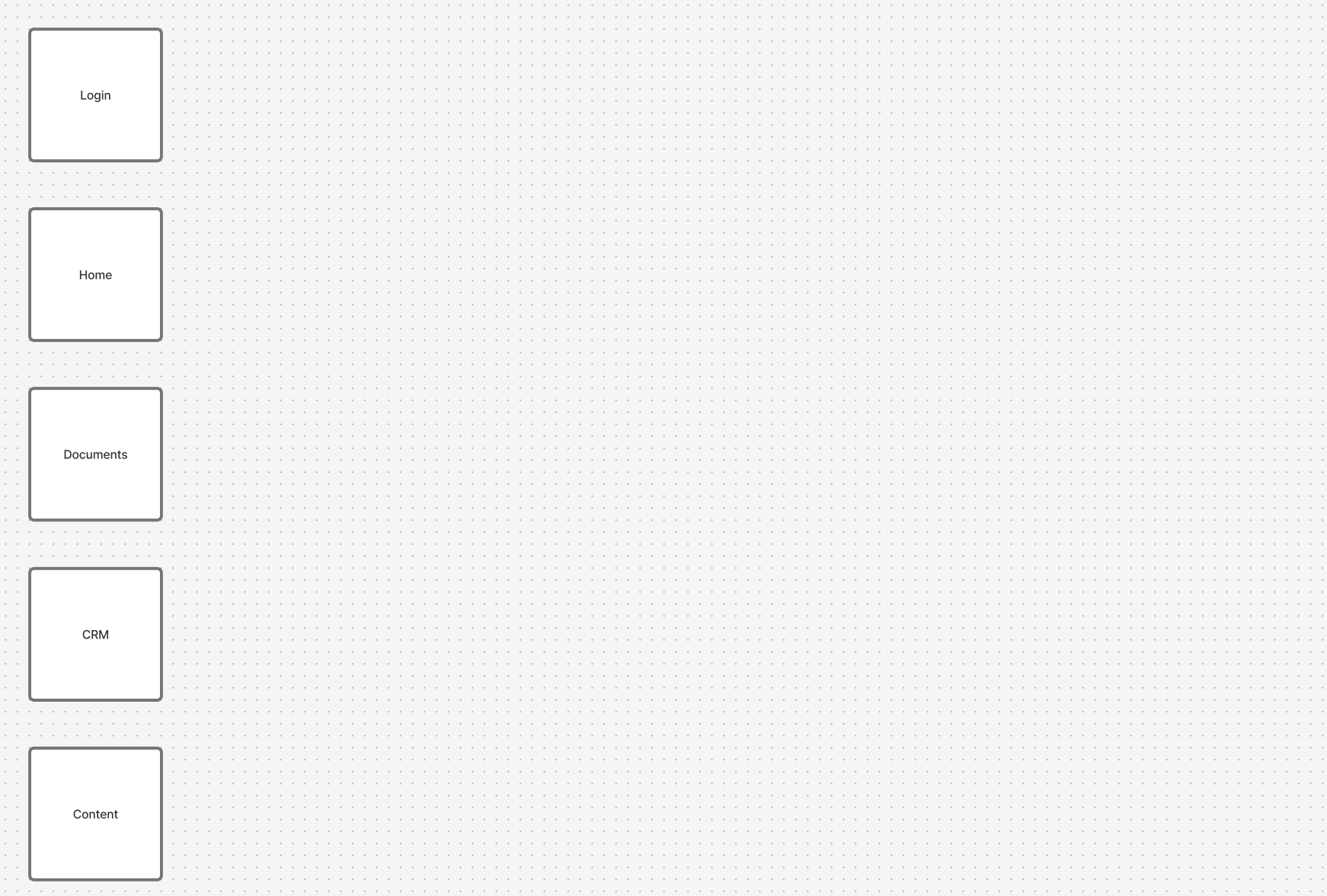
Next, for each section list the starting action(s) a user would complete and file those under their relevant sections. These are the reason your user would open your app. In no particular order, here are some the tasks we complete with this app.
The boxes are:
- Login
- Home
- Documents
- CRM Content (as in social media content)
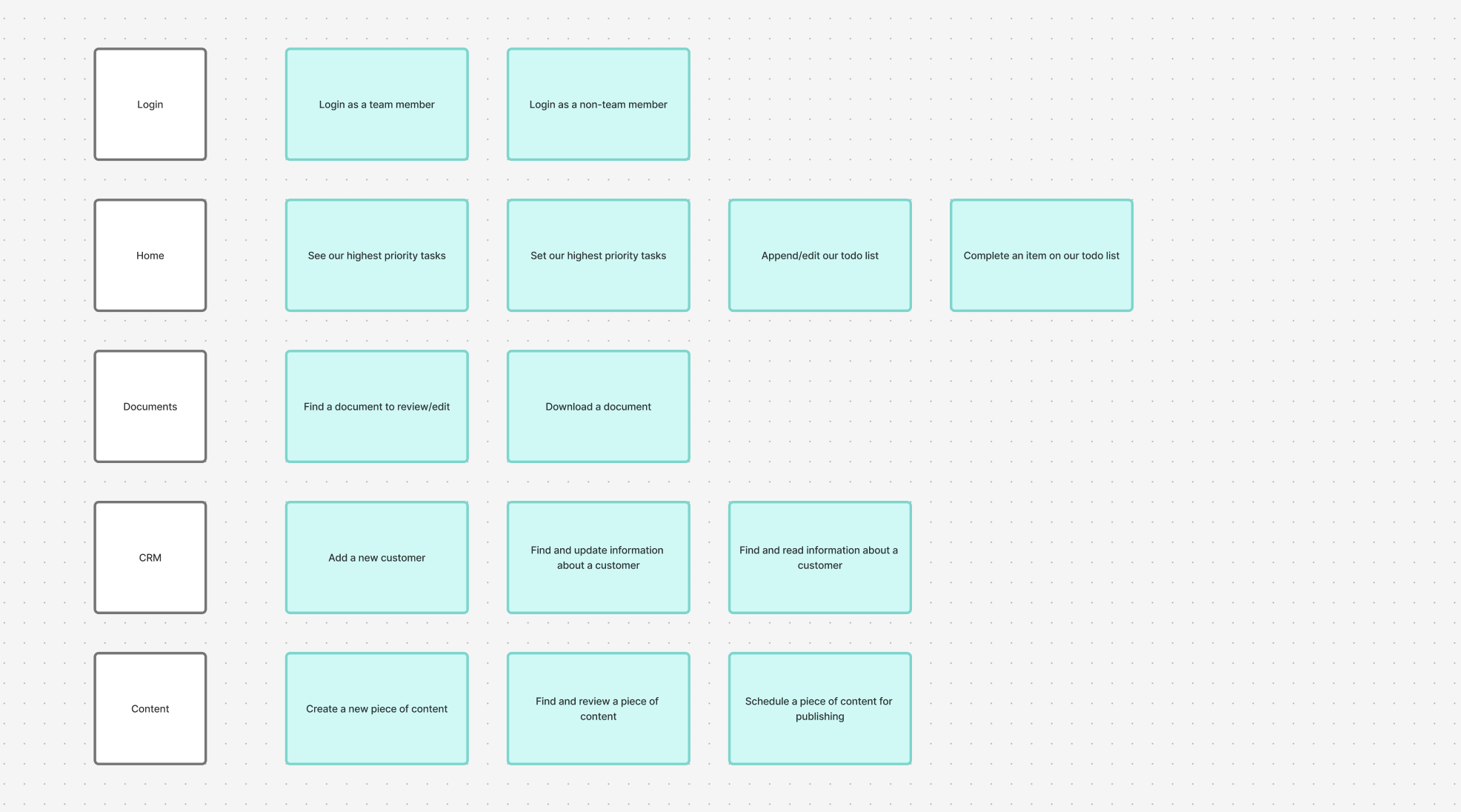
- Login: Login as a team member, Login as a non-team member
- Home: See our highest priority tasks, Set our highest priority tasks, Append/edit our todo list, Complete an item on our todo list
- Documents: Find a document to review/edit, Download a document
- CRM: Add a new customer, Find and update information about a customer, Find and read information about a customer
- Content: Create a new piece of content, Find and review a piece of content, Schedule a piece of content for publishing
#User personas
This is the opposite of what is typically done, you start with personas then move to creating your actions. However, in this case we are stating what tasks are completable then appending the context and environment that task is being done in.
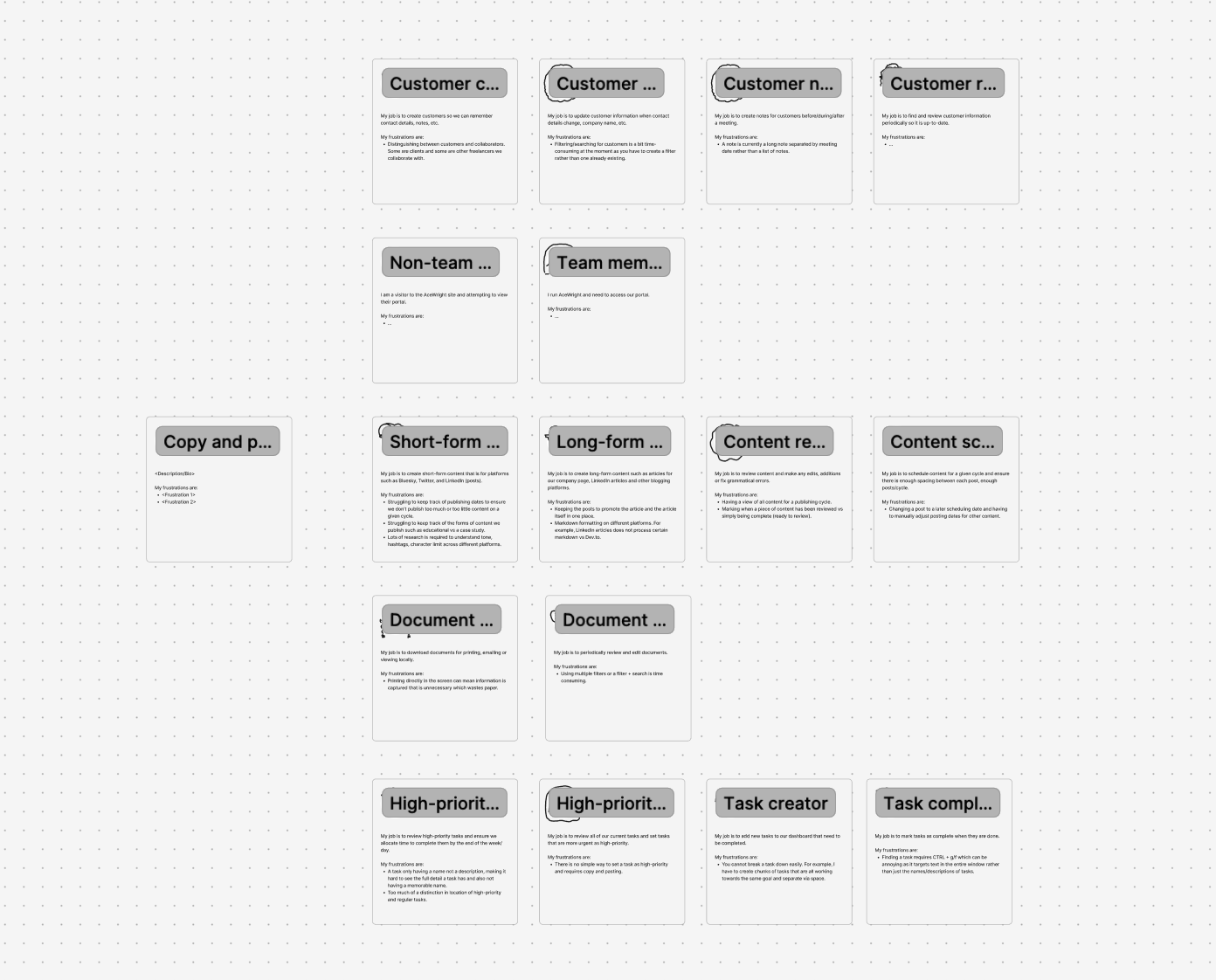
User personas help us to humanise the process. For example, as an independent these tasks are all done by me, however, they are done individually as separate tasks and using personas I am able to see the inneficiencies and intricacies of each task.
In larger teams this helps us identify areas where one character is placed on a lot of boxes (which we will see below) and will help us identify areas we can shorten a task or use integrations to speed up the process.
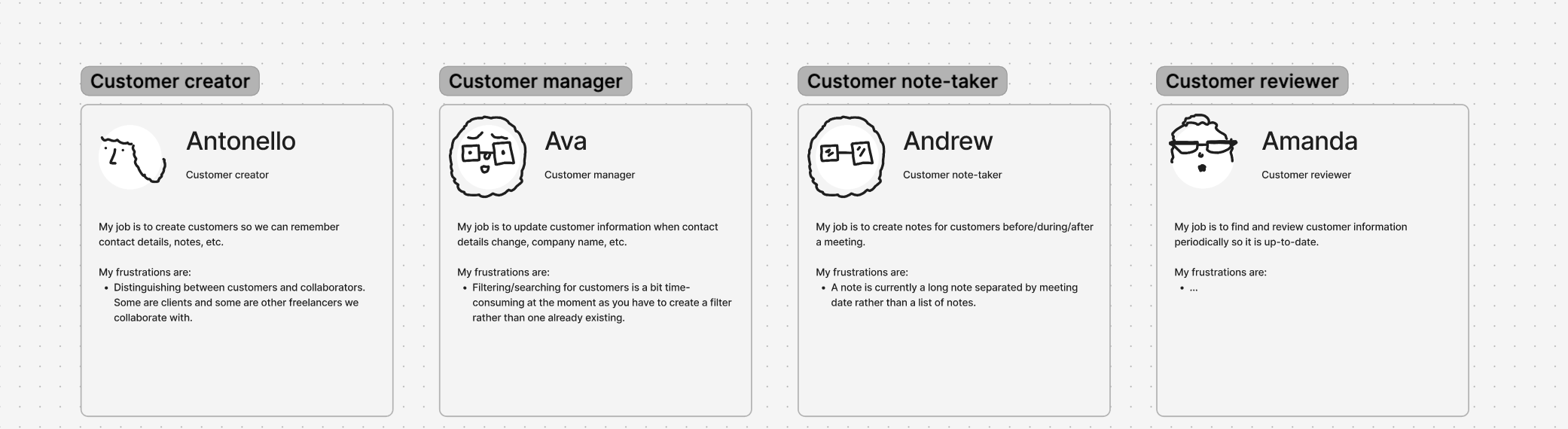
These user personas are not nearly as detailed as most. These include a recognisable character, name, job title, bio and frustrations. Some user personas expand this to include age, demographic, motivations and device types being used. These minimal versions are designed to aid on a time crunch.
#Expanding the flow
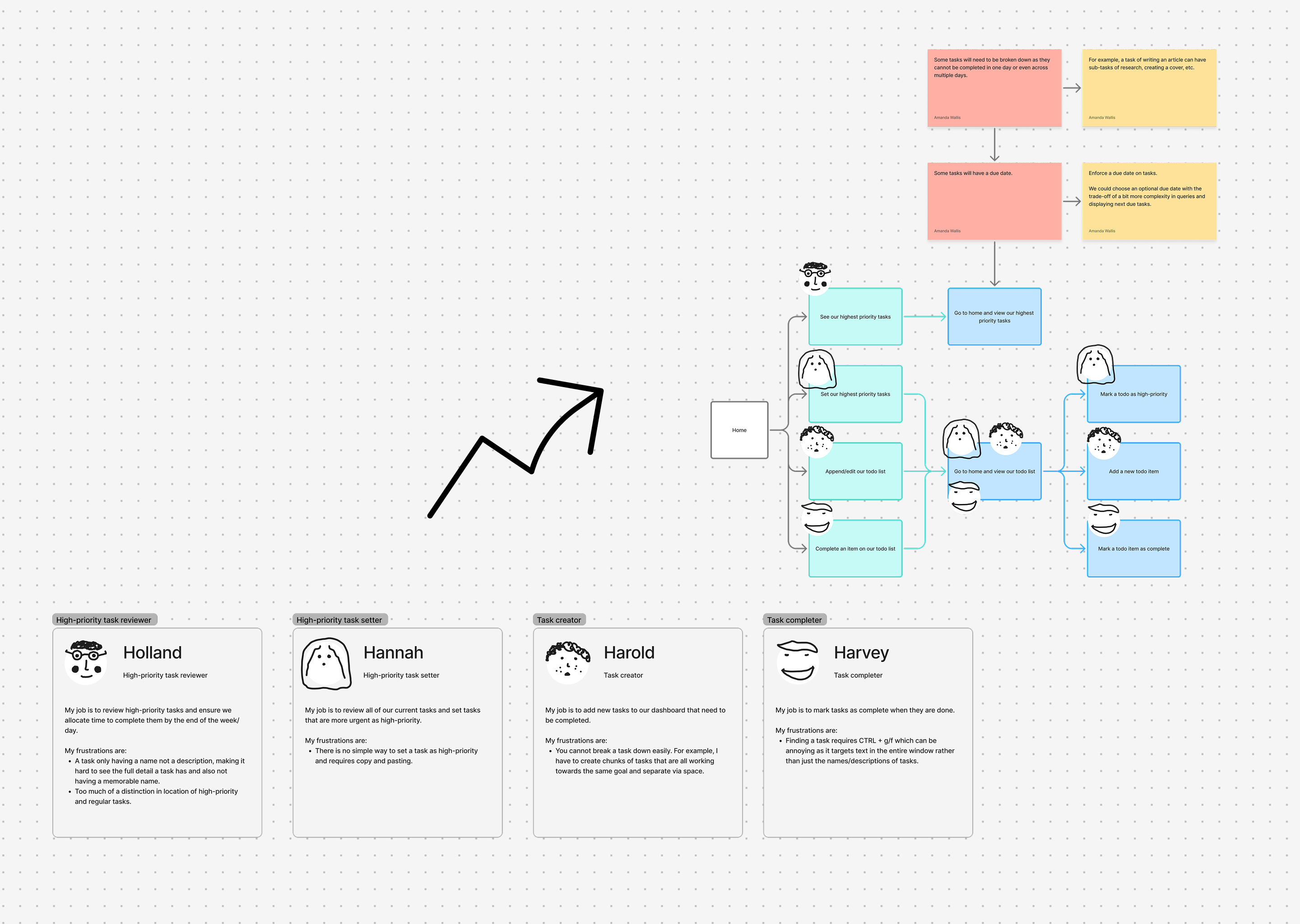
Still thinking of the user, list the next steps they would (theoretically) do based on your brief to complete their task. We can now also place our characters on their associated green boxes.
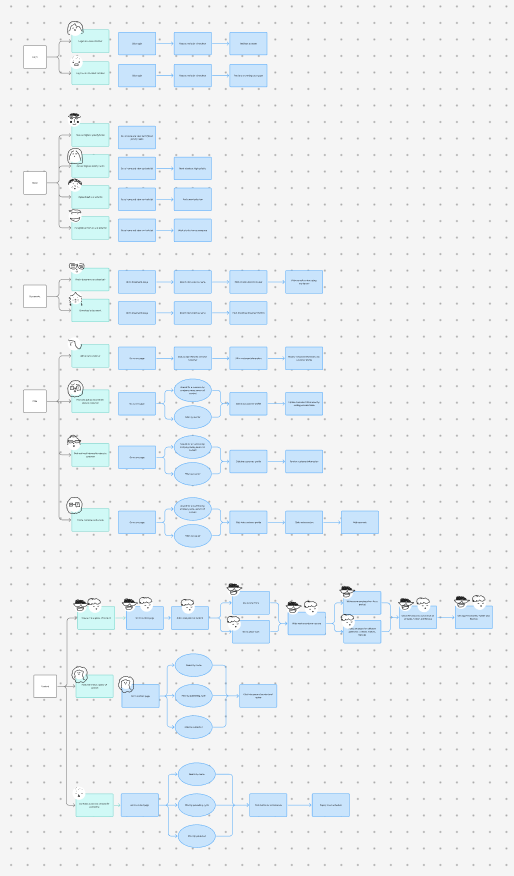
You also might on the above diagram that there are two characters on one box and they are also spread out across the green boxes.

This is because creating content is one task with two different motivations. Whether you choose to completely separate tasks like this at this stage or merge them slightly is not important.
#Simplifying
With our map we have been working for each action, list out everything we have to do. However, some actions have overlapping actions. To simplify our diagram we can merge them.
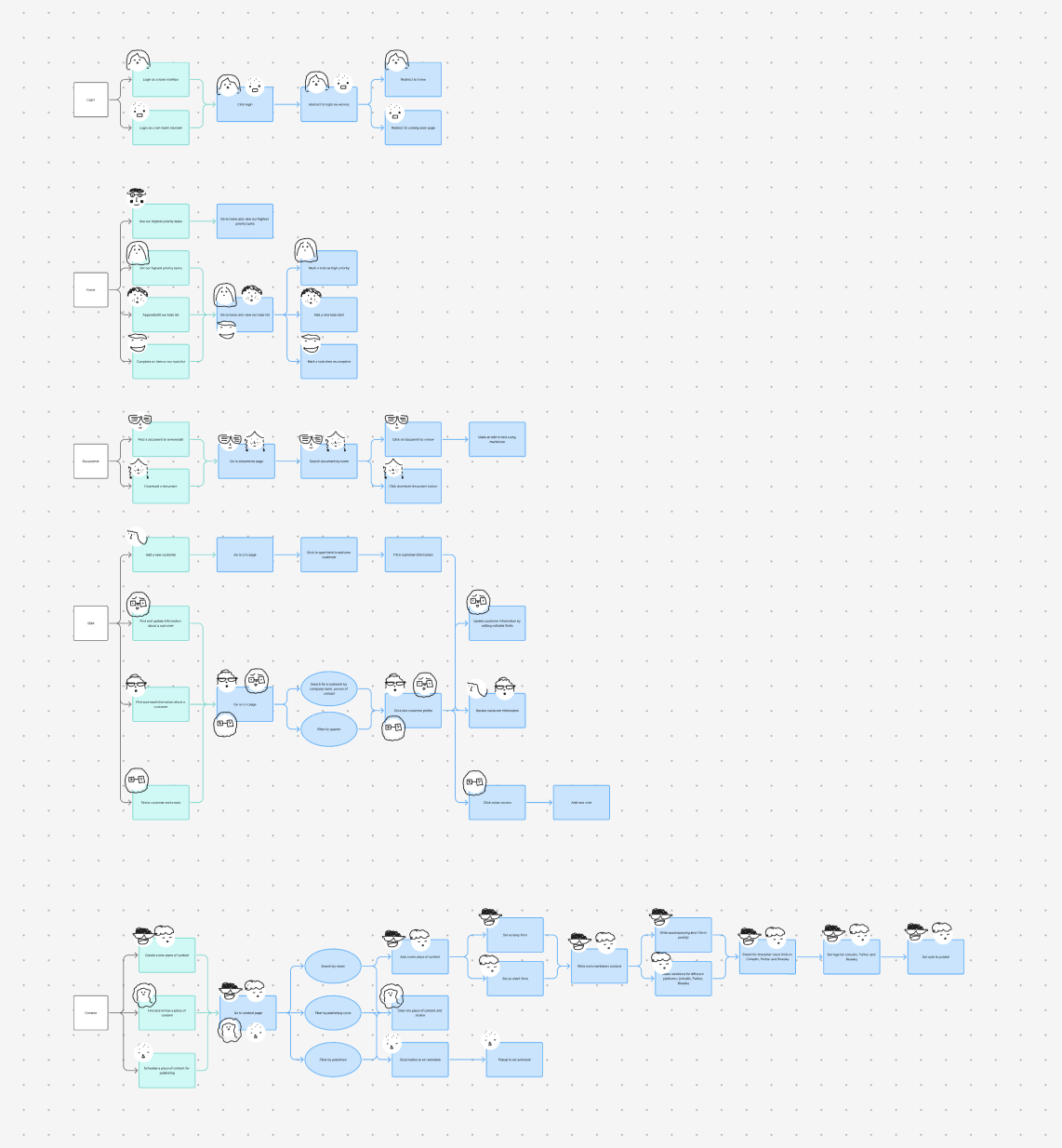
Now we have merged different actions so there is no duplicate action. For example, at the start, every single task requires going to the document page and filtering.
#Risk & Optimisation
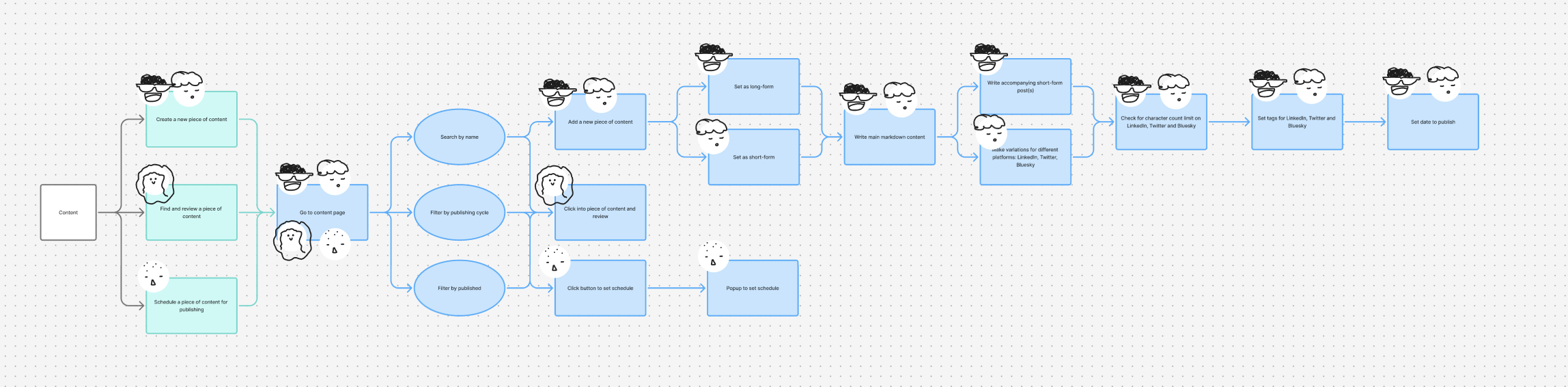
Now, we will start by looking for areas where we could make a mistake or there is an area for improvement. This could be missing a client meeting because we do not have a reminder, setting conflicting dates, etc. or using an API to find hashtags on twitter. Do not worry about adding too many boxes, we will not be building everything.
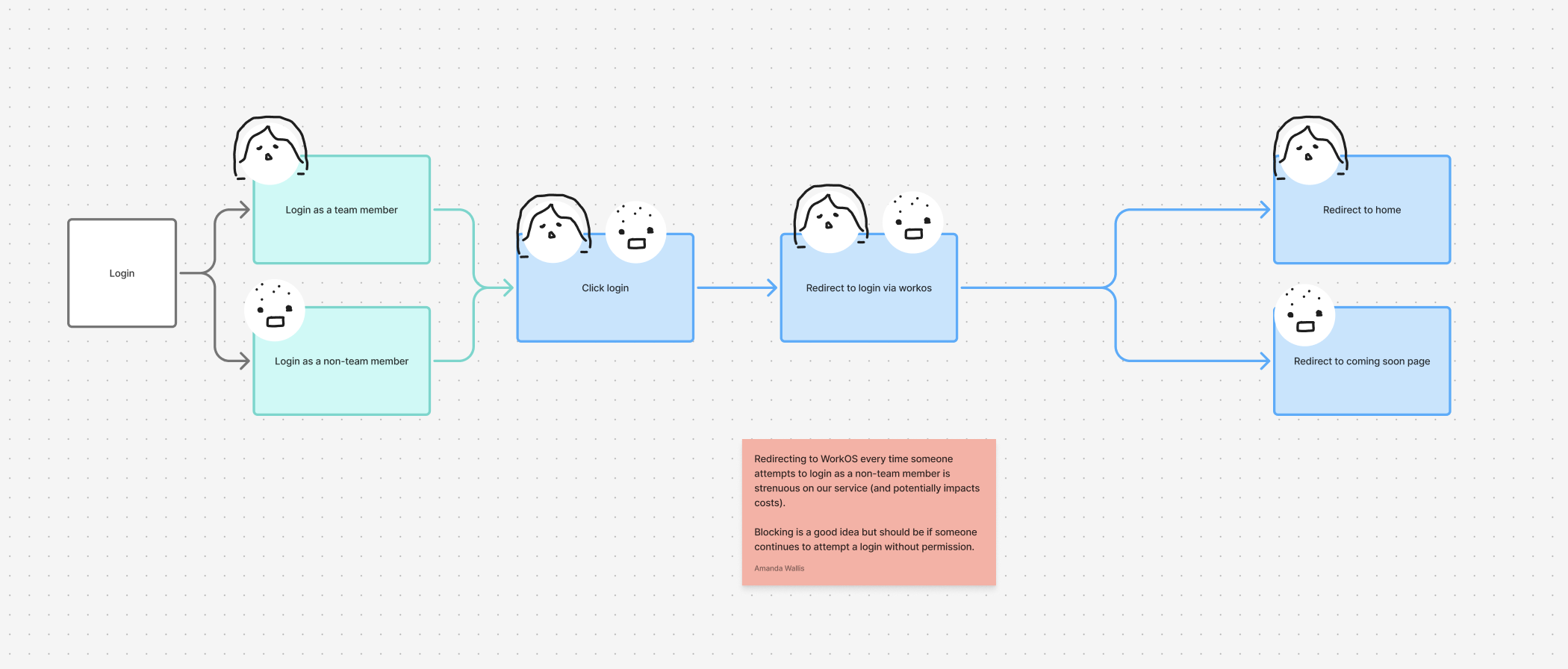
Take our login flow, we have an issue identified in red where redirecting to WorkOS for non-members is streneous.
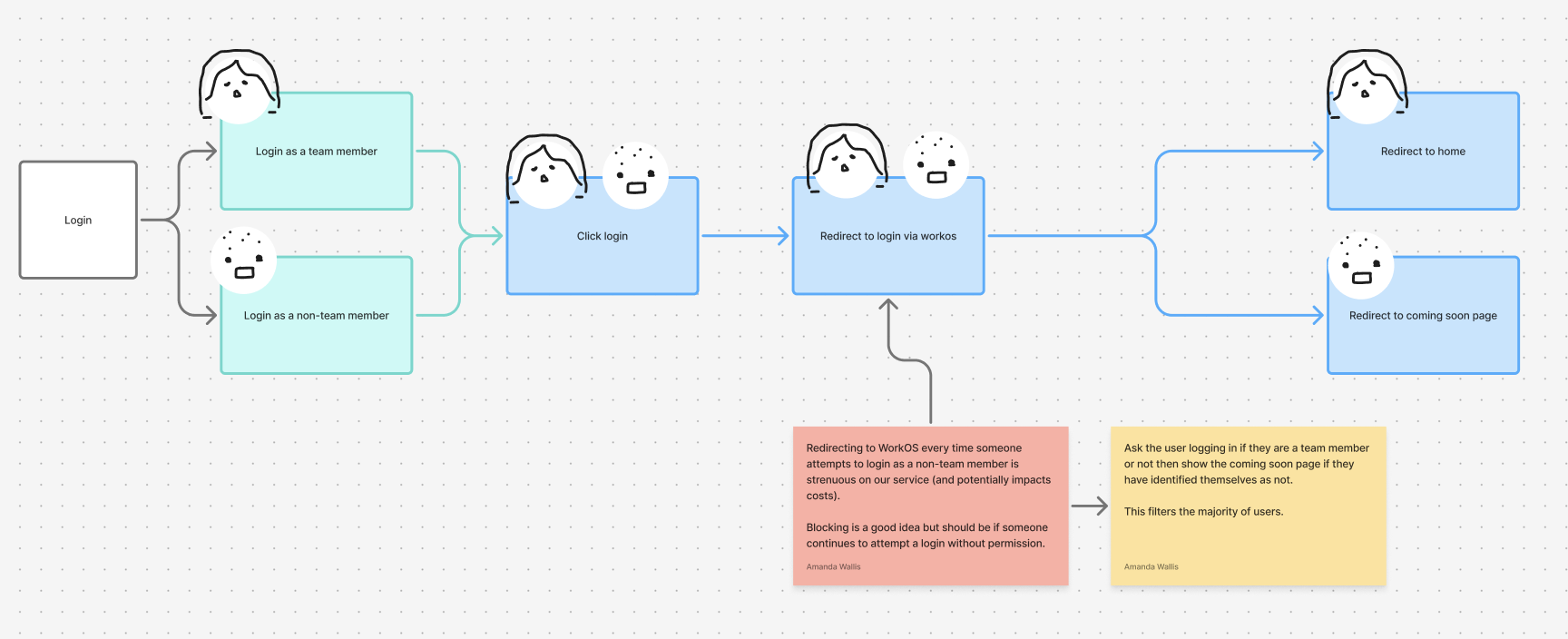
In yellow we add a note explaining how we can solve this issue. Sometimes the red note will imply a fix but the yellow note is a concrete solution.
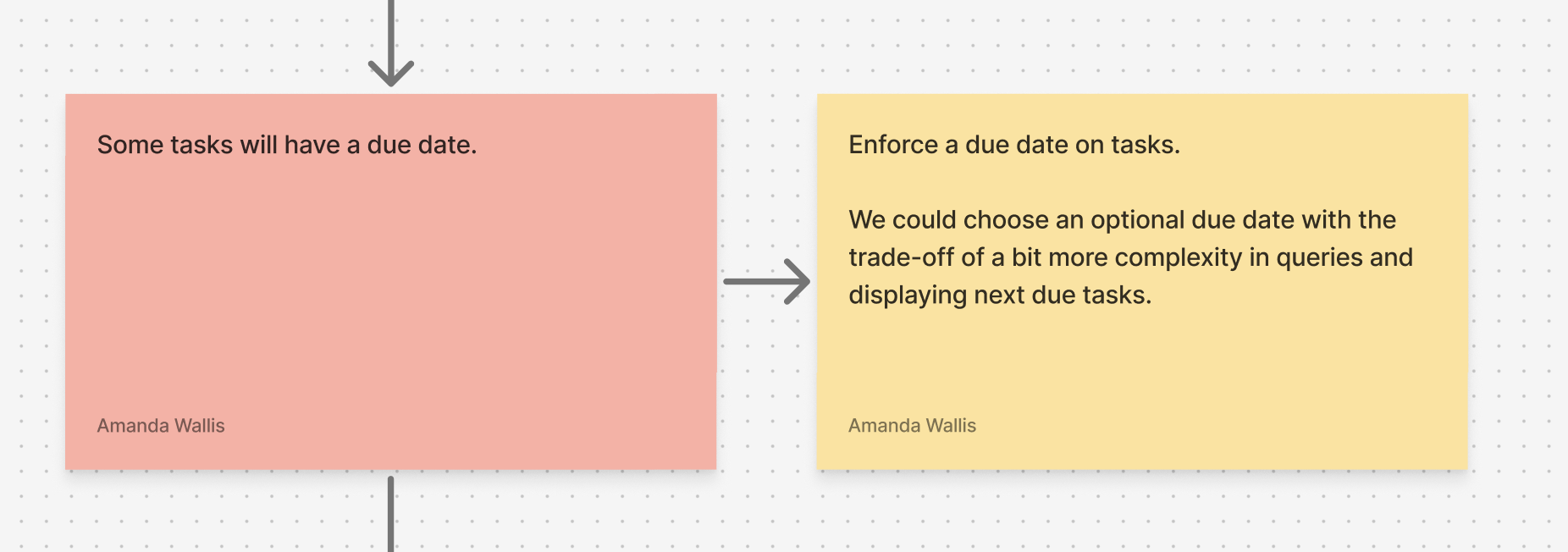
Here is a great place to start to discuss tradeoffs of different solutions. For example, here I note that some tasks have due dates other than simply being higher or lower priority. The solution I place is to enforce a due date on tasks even though I could make this optional for tasks that don’t need a due date, however, that comes with extra complexity.
That is why when developing products its important to include full skillsets from design to development to deployment.

#Priority setting
Of course, we are not able to implement every single feature and fix every possible issue at the start, as it might not have a return on investment from this. We will now prioritise issues based on how much we require a feature. We can use the following prioritisation:
- Mandatory w Legal Risk (black): We are required to have these to fulfill our businesses legal obligations (e.g. forgetting to file taxes)
- Business Critical (red): Core functionality required to function correctly (e.g. missing a deadline)
- High Impact (yellow): Strongly affects efficiency and other workarounds are error-prone (e.g.
- Moderate Impact (green): Improves workflows, usability or performance (e.g. checking for conflicting dates)
- Nice to Have (blue): Adds polish or minor convenience for manual tasks that can be done with little difficulty (e.g. coloured labels)
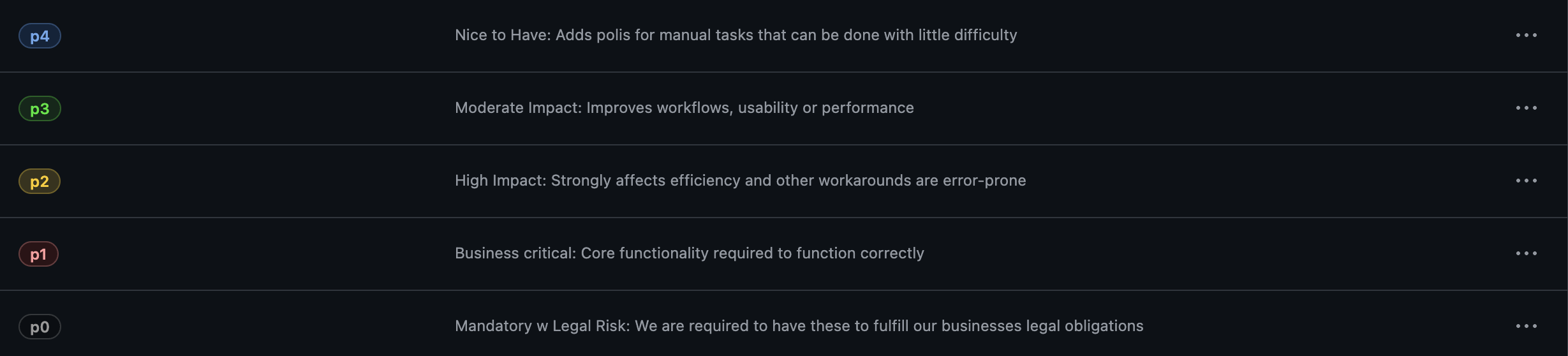
We are going to move to our issue tracker, we are using GitHub. First, let’s create our labels:
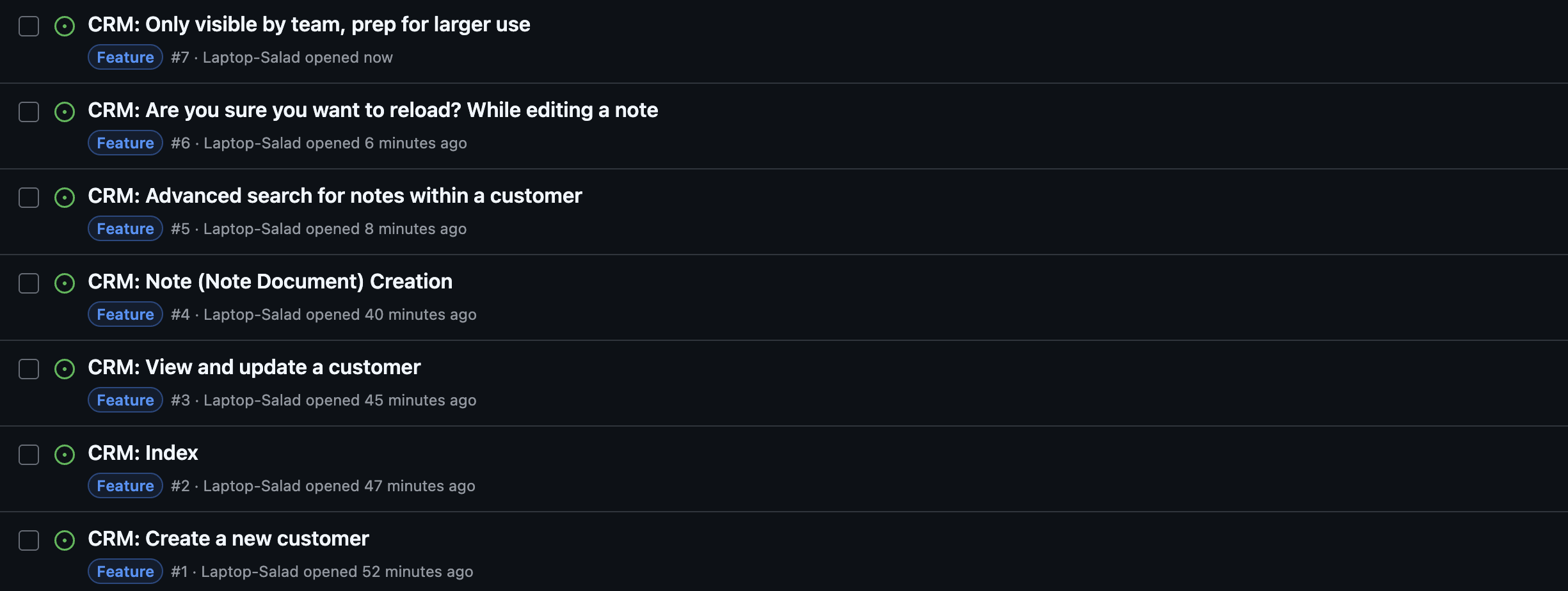
Next we are going to zoom in and focus only on the CRM. We have seven issues:
- Create a new customer
- Index
- View and update a customer
- Note creation
- Advanced search for notes within a customer
- Are you sure you want to reload? While editing a note
- Only allow CRM to be visible by members with team role
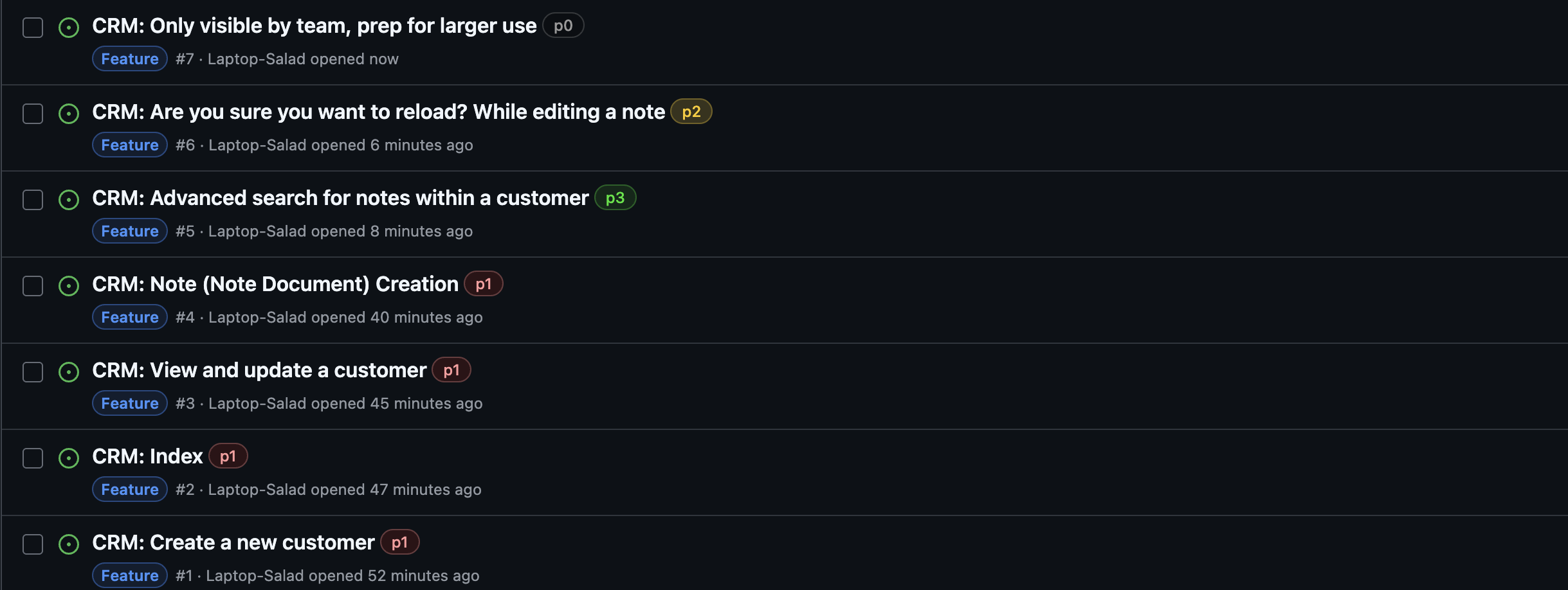
Based off of priority here is the new order:
- p0 Only allow CRM to be visible by members with team role
- p1 Create a new customer
- p1 Index
- p1 View and update a customer
- p1 Note creation
- p2 Are you sure you want to reload? While editing a note
- p3 Advanced search for notes within a customer
#Prerequisite Tickets
Some tickets will need to be done before others. For example, before viewing and updating a customer we need to create one. This is also because, internally, the form logic for updating a customer is the same as creating one.
There are a few ways to indicate this but we just add a comment on that ticket with something like: Requires: #1. The ‘#’ means that ticket number 1 will be linked.
#Other Design Considerations
Aside from features, as tickets were being written some other design decisions were made that were not mentioned in the flow.
#CRM Notes are Documents
In the last image you can see a ticket “CRM: Note (Note Document) Creation”. This is because a note has the same functionality as a document, just a different name and type. Internally, it will be a document with type of “Note”.
What was not mentioned in the flow, was that in the future we may want to attach customer agreements, or other documents to customers. This combined with the similar features means a note should be a document rather than a separate entity.
#CRM Only Visible by Team
Since this is only for our team for now, but in the future we would want users to have access to view documents, submit requests, etc. This means we need different users to have different roles and since to prevent having to spend time fixing and preparing our database to allow for roles we will simply handle it now by giving specific users a team role.
Anyone else trying to sign in will be blocked, as the flow describes.
#Outro
As you go along you may find that you need to make adjustments, edit your flow or delete tickets. That is a normal part of development as there is no way you can know every detail at the start. However, this way we:
- ✔️ Figured out every feature to build
- ✔️ Based our features off of user processes, so we know it wont get in the way
- ✔️ Identified any weak points or opportunities for error
All before writing a single line of code.
We are always open to helping teams and individuals tackling challenging problems in software development. If this project sounds like something you would need help with, please do not hesitate to schedule a 30-minute call with us to discuss your challenge.